Concept
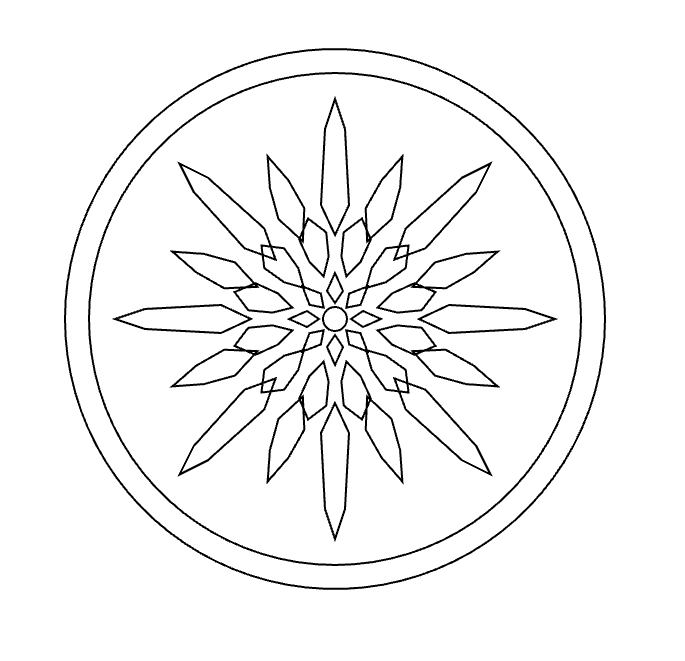
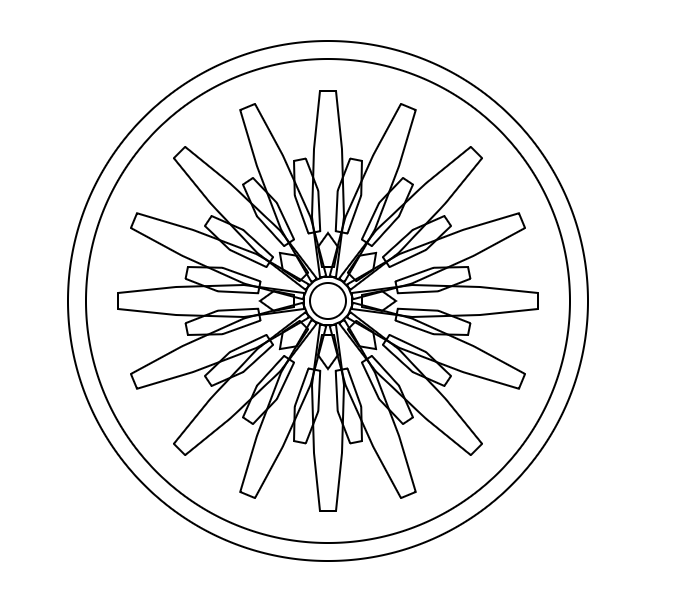
For this project, I wanted to create a radial design based on repetition and rotation. I started with one simple geometric shape and used p5.js to repeat and rotate it around a center point. I liked how a basic shape could become something much more complex just by changing its position and angle.
And i made two variatiosn of the design in order to play around with the code a little. The final designs started to remind me of a mix between a mechanical object, a flower, and a sunburst. I added the circular borders around it because I wanted the repeated shapes to feel contained instead of floating on their own, in a way.
I also wanted to experiment with how the same idea would look when fabricated using different materials, and ways of fabrication. I decided to test it first on wood and then on black acrylic. This allowed me to experiment with both engraving and cutting, rather than only producing the same result twice.
p5.js Sketch / Code
The main rule was to create one geometric shape and then rotate it around the center multiple times.
Instead of manually drawing every section, I used a loop so that p5.js could calculate the rotation for me. This made the pattern very even and symmetrical. I also used multiple circles to create the outside border and smaller shapes toward the center to make the pattern more detailed.
One thing I liked about working this way was that changing one number in the code could affect the entire design. For example, changing the number of sections, the size of a shape, or its distance from the center could create a completely different variation.
const W = 400;
const H = 400;

function setup() {
  createCanvas(W, H, SVG);
  angleMode(DEGREES);
  noLoop();
}

function draw() {
  background(255);
  translate(width / 2, height / 2);

  noFill();
  stroke(0);
  strokeWeight(1);

  circle(0, 0, 260);
  circle(0, 0, 242);

  let sections = 16;

  for (let i = 0; i < sections; i++) {
    push();
    rotate(i * (360 / sections));

    beginShape();
    vertex(12, -4);
    vertex(42, -8);
    vertex(76, -7);
    vertex(105, -4);
    vertex(105, 4);
    vertex(76, 7);
    vertex(42, 8);
    vertex(12, 4);
    endShape(CLOSE);

    pop();
  }

  for (let i = 0; i < sections; i++) {
    push();
    rotate(i * (360 / sections) + 11.25);

    beginShape();
    vertex(35, -3);
    vertex(55, -6);
    vertex(72, -3);
    vertex(72, 3);
    vertex(55, 6);
    vertex(35, 3);
    endShape(CLOSE);

    pop();
  }

  let innerSections = 8;

  for (let i = 0; i < innerSections; i++) {
    push();
    rotate(i * 45);

    beginShape();
    vertex(17, -3);
    vertex(27, -5);
    vertex(34, 0);
    vertex(27, 5);
    vertex(17, 3);
    endShape(CLOSE);

    pop();
  }

  circle(0, 0, 18);
}

function mouseClicked() {
  save("version1.svg");

}
const W = 400;
const H = 400;
function setup() {
createCanvas(W, H, SVG);
angleMode(DEGREES);
noLoop();
}
function draw() {
background(255);
translate(width / 2, height / 2);
noFill();
stroke(0);
strokeWeight(1);
circle(0, 0, 270);
circle(0, 0, 246);
let sections = 16;
for (let i = 0; i < sections; i++) {
push();
rotate(i * (360 / sections));
let end;
if (i % 2 === 0) {
end = 110;
} else {
end = 88;
}
beginShape();
vertex(42, 0);
vertex(57, -7);
vertex(end - 15, -5);
vertex(end, 0);
vertex(end - 15, 5);
vertex(57, 7);
endShape(CLOSE);
pop();
}
let secondRing = 12;
for (let i = 0; i < secondRing; i++) {
push();
rotate(i * (360 / secondRing) + 15);
beginShape();
vertex(22, 0);
vertex(31, -5);
vertex(43, -7);
vertex(52, 0);
vertex(43, 7);
vertex(31, 5);
endShape(CLOSE);
pop();
}
let centerPetals = 8;
for (let i = 0; i < centerPetals; i++) {
push();
rotate(i * 45);
beginShape();
vertex(8, 0);
vertex(14, -4);
vertex(23, 0);
vertex(14, 4);
endShape(CLOSE);
pop();
}
circle(0, 0, 12);
}
function mouseClicked() {
save("version2.svg");
}Vector Design
After creating the designs in p5.js, I exported them as an SVG so that they could be prepared for the laser cutting.
At this stage, I realized that something looking correct on my laptop did not automatically mean that it would work correctly with the laser cutter. I had to pay much more attention to the vector lines, especially their thickness and how close they were to each other.
I also had to think about the designs for when I wanted to engrave and when I wanted to cut. This became especially important when I moved from wood to acrylic.
Test 1 – Wood
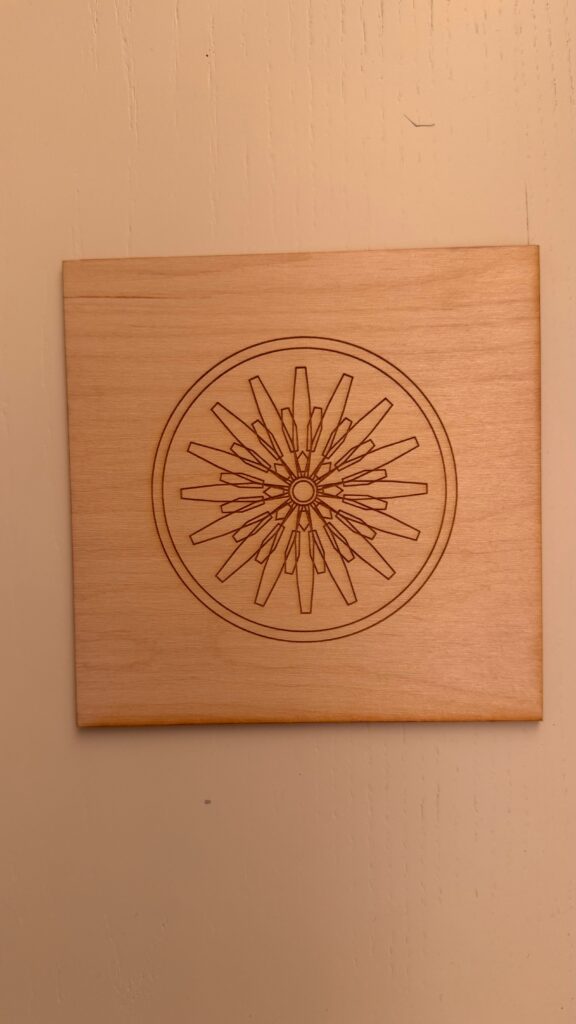
For my first physical test, I used wood. I mainly experimented with engraving the design into the surface.
I liked this version because the wood kept a lot of the smaller details from my original digital design. The repeated lines were clearly visible, and I could see the different layers of the pattern.
This test helped me understand how the laser translated my vector lines into an actual material. It also showed me that line thickness and laser settings mattered much more than I originally expected.
Test 2 – Black Acrylic
For my second version, I changed the material to black acrylic and experimented more with cutting and negative space.
This produced a very different result even though it came from the same original idea. Instead of only seeing lines engraved onto a surface, parts of the repeated pattern were physically removed.
I actually liked how the acrylic version simplified the pattern. The empty spaces became part of the design and made the radial shape stand out more strongly.
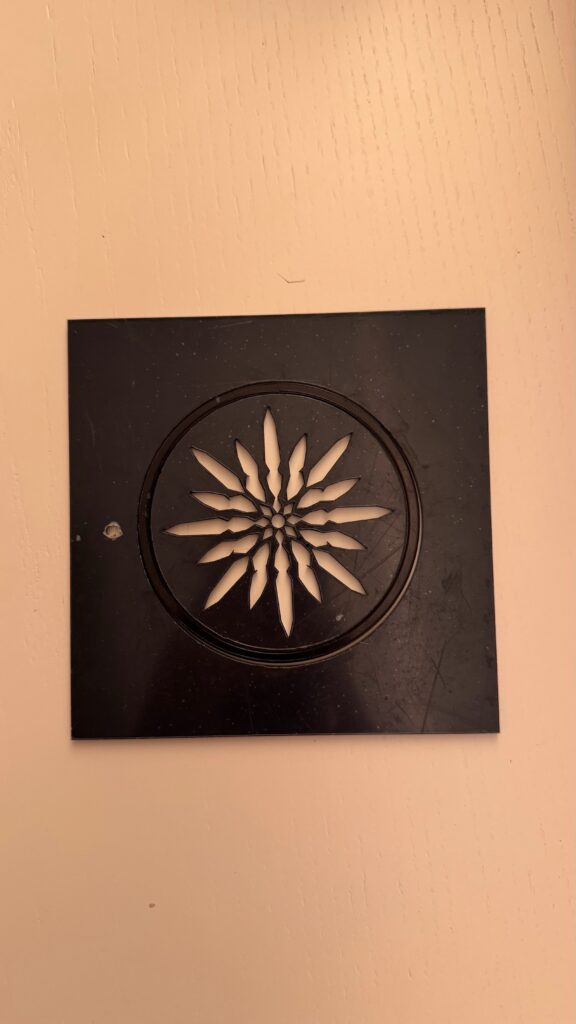
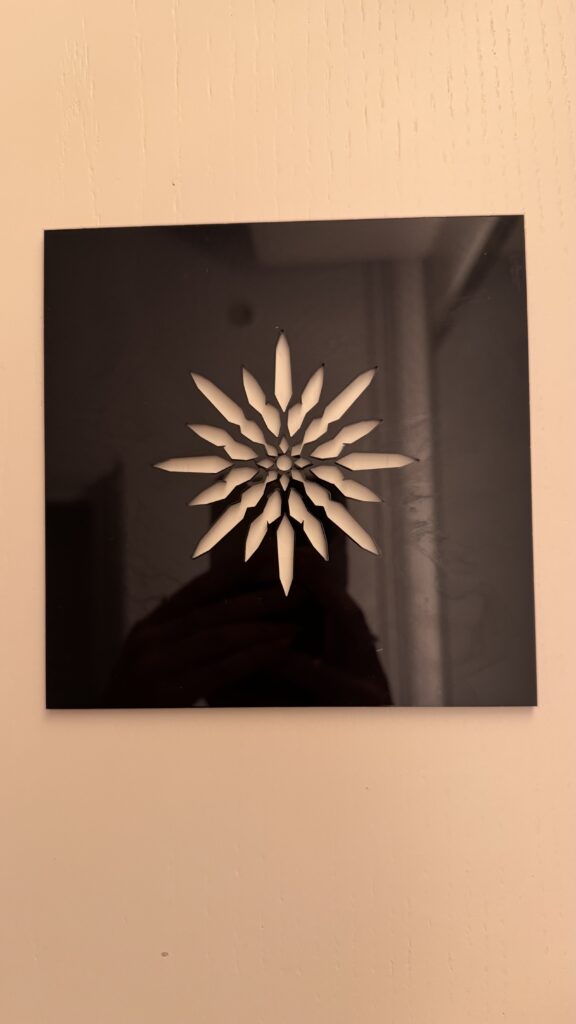
I expirmented with and without the surrounding circle because the lines engraving and cutting were giving me a hard time with my specfic design so that definitely helped me gain the skill to perfect the design for the given task.
Process and Challenges
One of my biggest challenges was making sure that my design was actually suitable for laser fabrication. The lines looked clear on the computer, but I had to make sure that their thickness was appropriate and that the laser settings were correct for both engraving and cutting. If the lines were too thin or the settings were not strong enough, some details would not be visible. At the same time, I did not want the lines to become so heavy that I lost the smaller details of the pattern.
Another challenge was working with the difference between engraving and cutting. The wood version could keep many overlapping lines because they were engraved onto the surface, while with the acrylic version I had to think about what would physically happen when areas were completely cut out. This made me pay much more attention to negative space and the connections between shapes.
A more practical challenge was booking time in the IM Lab. I didnt realize that i had booked time just for one of the tiles, so I had to book another appoinment in order to laser cut the second variation. Next time, I would book my lab time for longer so that I have more time for testing and making adjustments if something does not work as expected.
Reflection
This project changed the way I think about computational design because I realized that the code is only one part of the final result.
When I first created the design in p5.js, I was mostly thinking about what looked interesting on the screen. Once I started using the laser cutter, I had to think about completely different things, like line thickness, material, engraving, cutting, negative space, and whether small details would actually survive fabrication.
The biggest difference for me was seeing the wood and acrylic versions next to each other. The wood kept more of the detailed line work, while the acrylic created stronger negative spaces because parts of the material were cut away. I did not expect the material to change the feeling of the design this much.
I also learned that testing is really important. A design can look finished digitally but still need changes once it becomes physical. If I continued developing this project, I would experiment with changing the number and size of the repeated shapes and possibly create more variations using different materials.
Overall, laser fabrication did not just reproduce my computational design. It actually changed the way I designed it, because I had to start thinking about how every digital line would behave as a physical object.