Concept
For this assignment, I wanted to see how simple geometric shapes could become more complicated designs through repetition, scale and rotation. I started playing with different designs in p5.js based on rule-based systems, and then I started thinking about how to translate these from a digital design to a physical object using the laser cutter. I went through a few patterns and then narrowed it down to my two favourite designs. In both final designs I concentrated on how the position of each shape in relation to the centre could control the way in which the pattern changed.
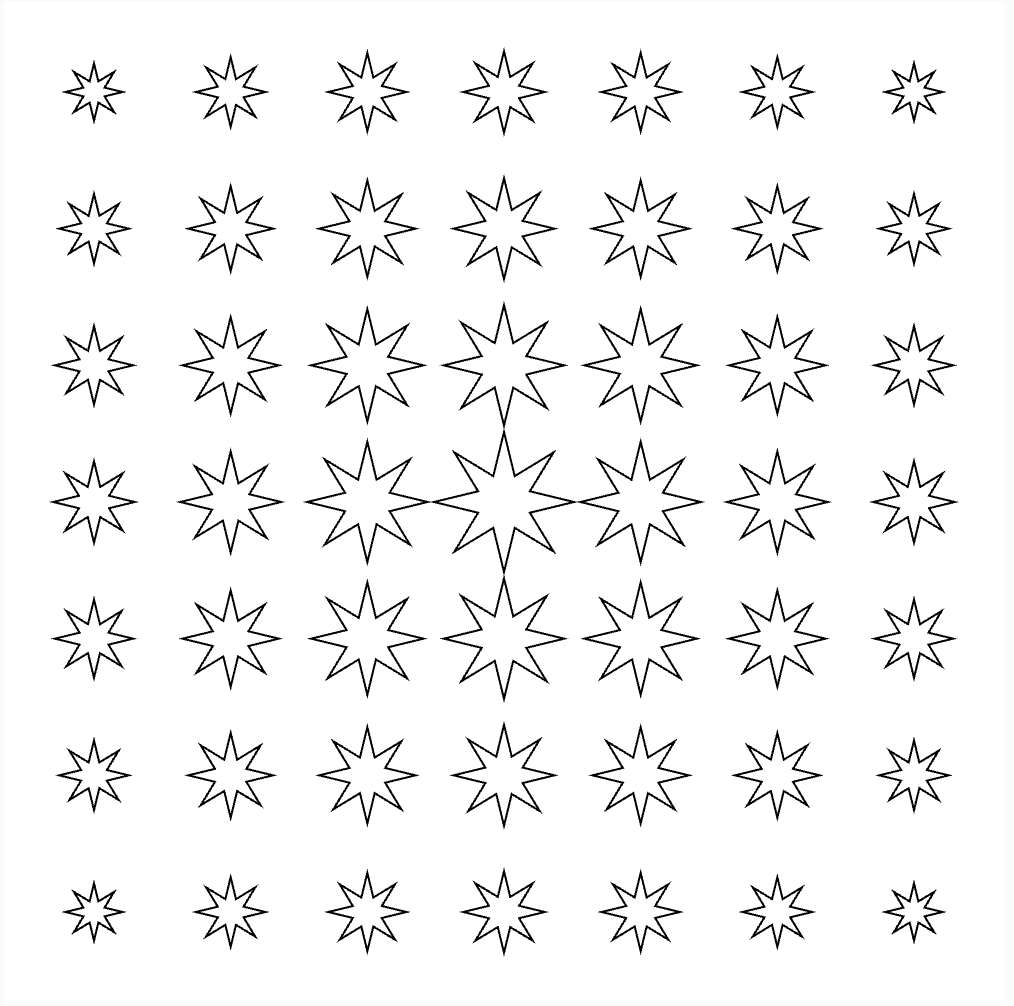
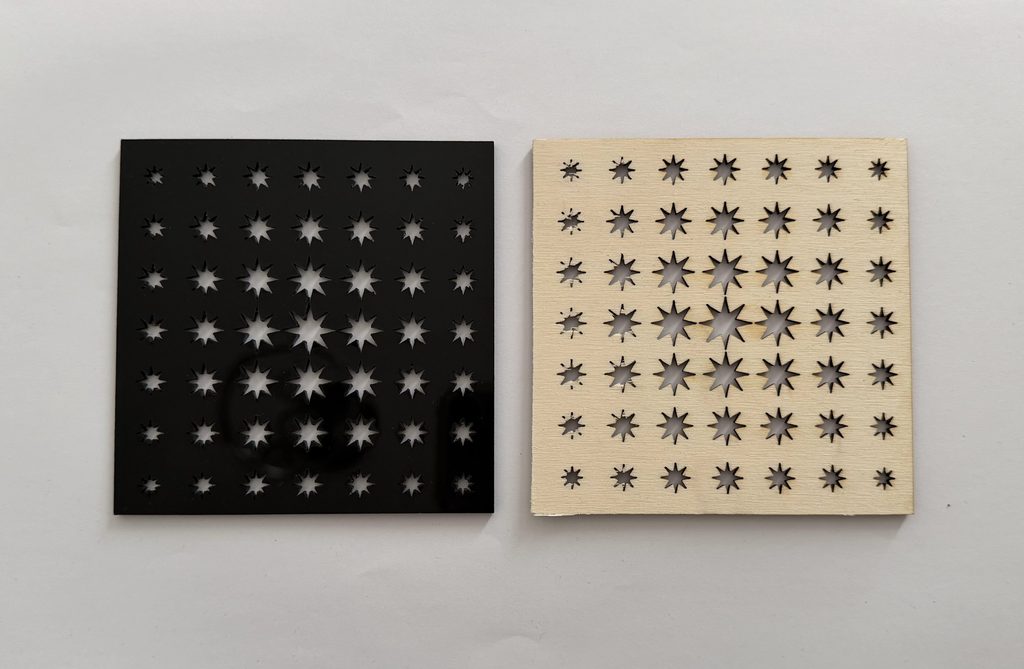
My first final design uses repeated eight-point stars. The size of each star is determined by its distance from the centre of the canvas. The stars are largest near the centre and gradually become smaller toward the edges. I really wanted this change in scale to create a clear focal point while still using the same repeated shape throughout the design.
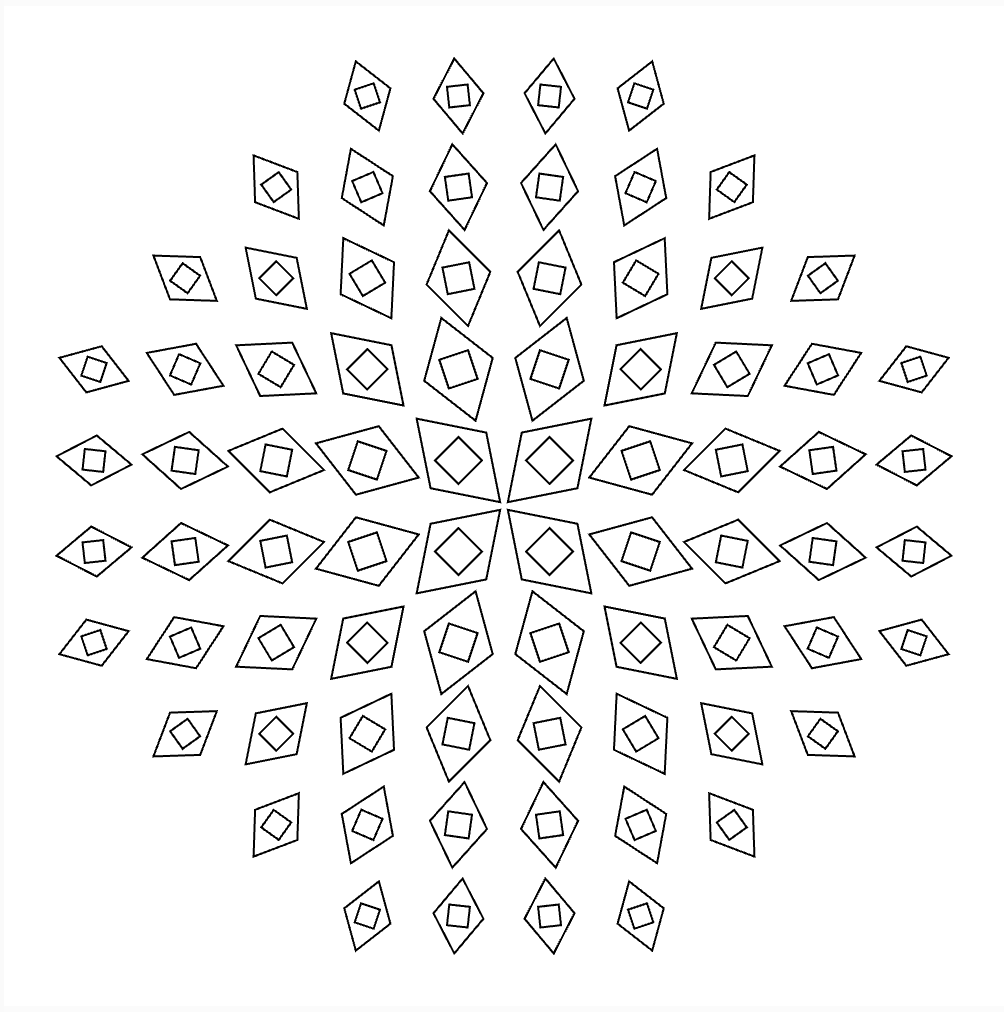
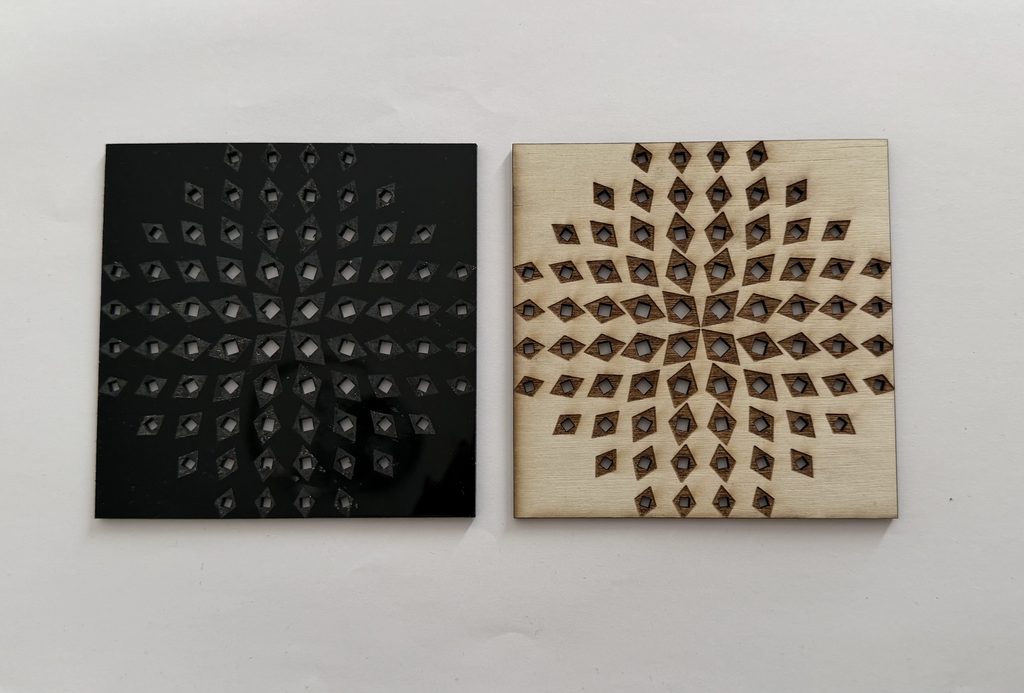
For my second design I used a motif of two diamond shapes. The motif is repeated around the composition, a larger diamond contains a smaller rotated diamond. Its size depends on how far it is from the centre, and its rotation depends on where it is around the centre. That creates a more circular, dynamic pattern, even with the shapes initially being placed on a grid.
Both start with pretty simple geometry, but the different rules used for them lead to very different results.
Design 1: Star Gradient
For my first design, I made a grid of eight-point stars then used dist() to calculate the distance between each star and the centre of the canvas. I then used map() to connect this distance to the size of the star, which means that I didn’t manually decide the size of every individual star. Instead, the code follows one rule: distance from the centre -> size of the star. So the stars closest to the centre are the largest, while the stars gradually become smaller as they move farther away.
let cols = 7;
let rows = 7;

function setup() {createCanvas(500, 500, SVG);

  background(255);
  noFill();
  stroke(0);
  strokeWeight(1);

  let margin = 45;
  let spacingX = (width - margin * 2) / (cols - 1);
  let spacingY = (height - margin * 2) / (rows - 1);
  for (let r = 0; r < rows; r++) {
    for (let c = 0; c < cols; c++) {
      let x = margin + c * spacingX;
      let y = margin + r * spacingY;
      // Distance from centre
      let d = dist(x, y, width / 2, height / 2);
      // Larger near centre
      let size = map(d, 0, 350, 35, 10);
      size = constrain(size, 10, 35);
      push();
      translate(x, y);
      drawStar(0, 0, size * 0.4, size, 8);
      pop();
    }
  }
}

function drawStar(x, y, inner, outer, points) {
  let step = TWO_PI / points;
  beginShape();
  for (let i = 0; i < points; i++) {
    let a = i * step - HALF_PI;
    vertex(x + cos(a) * outer, y + sin(a) * outer);
    let b = a + step / 2;
    vertex(x + cos(b) * inner, y + sin(b) * inner);
  }
  endShape(CLOSE);
}

function mouseClicked() {
  save("star-gradient.svg");
}
Design 2: Geometric Vortex
For my second design I wanted to play more with rotation. I made a repeated motif of one large diamond with a small rotated diamond inside it. As with the first design, I used the distance from the centre to control the scale of each motif. But I also calculated the position of each motif around the centre and used this to control its rotation. This creates a circular composition: the diamonds appear to rotate around the centre. I also confined the motifs to a circular area, rather than over the entire square canvas. The main rules for this design are: distance from centre -> size & position around centre -> rotation.
let cols = 10;
let rows = 10;

function setup() {
  createCanvas(500, 500, SVG);

  background(255);
  noFill();
  stroke(0);
  strokeWeight(1);

  let margin = 45;
  let spacingX = (width - margin * 2) / (cols - 1);
  let spacingY = (height - margin * 2) / (rows - 1);
  for (let r = 0; r < rows; r++) {
    for (let c = 0; c < cols; c++) {
      let x = margin + c * spacingX;
      let y = margin + r * spacingY;
      // Distance from centre
      let d = dist(x, y, width / 2, height / 2);
      // Only draw shapes inside a circular area
      if (d < 220) {
        // Angle of each shape around the centre
        let angle = atan2(y - height / 2, x - width / 2);
        // Outer diamonds get smaller toward the edge
        let outerSize = map(d, 0, 220, 42, 24);
        // Inner diamonds get smaller
        let innerSize = map(d, 0, 220, 25, 14);
        push();
        translate(x, y);
        rotate(angle + HALF_PI);
        drawDiamond(outerSize, outerSize * 1.5);
        push();
        rotate(radians(45));
        drawDiamond(innerSize, innerSize);
        pop();
        pop();
      }
    }
  }
}

function drawDiamond(w, h) {
  beginShape();
  vertex(0, -h / 2);
  vertex(w / 2, 0);
  vertex(0, h / 2);
  vertex(-w / 2, 0);
  endShape(CLOSE);
}

function mouseClicked() {
  save("geometric-vortex.svg");
}
Other Design Experiments
Before deciding on my final two designs, I created two other patterns in p5.js. I liked how these experiments looked digitally, but while preparing them for fabrication, I realised that they would not work properly with the laser cutter. The main issue was that I had initially been thinking about the lines as outlines on a screen rather than as actual cut paths. Some of the shapes overlapped or were positioned in ways that could create loose and disconnected pieces once the laser followed those lines.
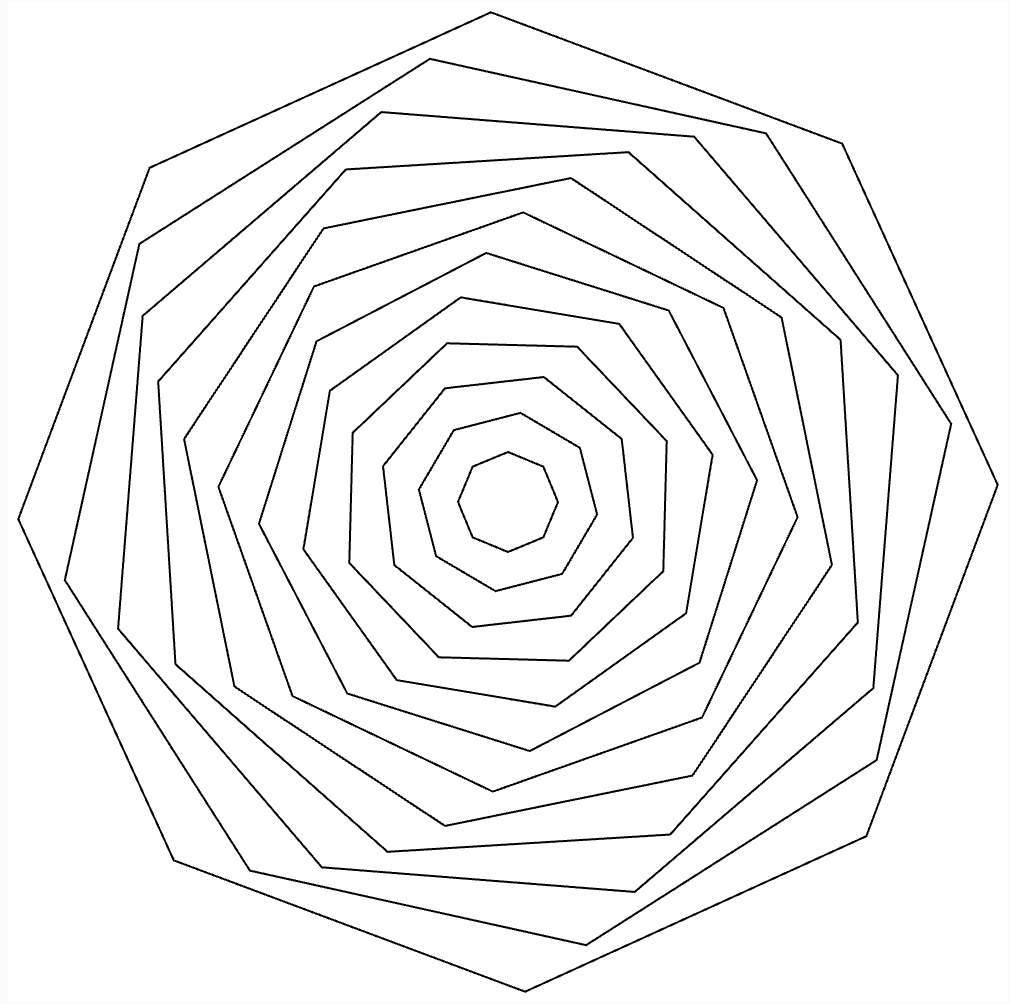
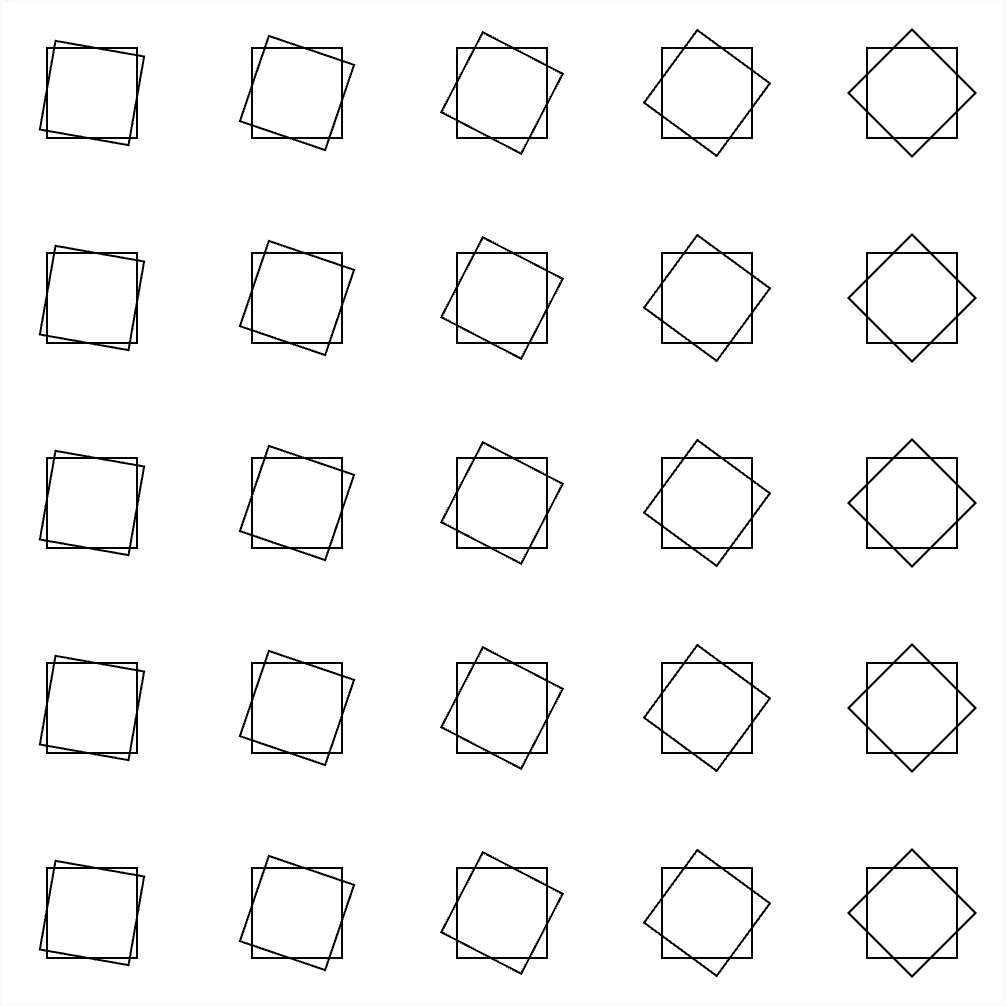
These experiments were still useful because they changed the way I approached the final designs. They made me think more carefully about negative space, the distance between shapes, and what would actually remain after the material was cut.
Vector Designs
Once I had chosen my final two designs, I exported them from p5.js as SVG files so they could be prepared for the laser cutter. Exporting the designs as vectors was important because the laser cutter follows the paths created by the code. At this stage, I had to look at the designs differently from how I viewed them in p5.js. Instead of only considering the overall visual pattern, I had to consider what each individual line would do when it became a cut.
Design 1 – Star Gradient
SVG File
Design 2 – Geometric Vortex
SVG File
Fabrication and Testing
For my physical tests, I used the two final designs. The first test used the star gradient pattern. This allowed me to test how the gradual change in the scale of the stars translated from the digital version into a physical material. The second test used the geometric vortex pattern. This design has more detail because each repeated unit contains both an outer and inner diamond. I wanted to see how the changing scale, rotation, and smaller negative spaces would translate when fabricated.
Test 1
Design: Star Gradient
Material: Wood & Acrylic
Test 2
Design: Geometric Vortex
Material: Wood & Acrylic
Process and Challenges
One of my main struggles throughout the process was finding the balance between making the designs visually interesting and keeping the computational rules clear. Some of my first experiments were more focused on making an interesting pattern but I eventually wanted the changes in the design to have a clearer relationship to the code. This made me use position and distance as variables for controlling scale and rotation. Another challenge was understanding the difference between designing for a screen and designing for fabrication. A line in p5.js might just be an outline, but for the laser cutter the same line is an actual cut. It was especially true for the two previous designs I decided not to build. They seemed to be successful in the digital world but when cut parts of the pattern would have become disconnected or loose pieces.
I also experienced challenges during the laser-cutting stage itself. Because of difficulties with the laser cutter and the limited amount of time available to use it, I was not able to return to my two earlier designs, redesign them, and test whether I could make them suitable for fabrication. Instead, I focused the available time on testing the two designs that I had already developed further. The process therefore became partly about deciding what was realistically possible to fabricate within the available time, rather than only choosing the patterns I liked visually.
Reflection
This assignment changed the way I thought about computational design because I had to consider both the digital and physical results of my code. At the beginning, I was mainly thinking about whether a pattern looked visually interesting in p5.js. Once I began preparing the designs for laser cutting, I realised that every line generated by the code could have a physical consequence. This was especially noticeable with the two designs that I was not able to fabricate. They worked as digital patterns, but their overlapping or disconnected geometry created problems when I considered them as cut paths. This made me pay more attention to negative space, connections, spacing, and the size of smaller details.
The limitations I had with the laser cutter were part of the process also. I would have wanted to go back to my earlier experiments and redesign them based on what I had learned but time constraints did not permit me to re-test them. If I were to continue with the project I would develop those designs to make sure the separate shapes were connected and play around more with the use of negative space being incorporated into the pattern. Overall, the assignment helped me understand that designing computationally for fabrication is not only about what the code produces on screen. The material, cutting process, negative space, and limitations of the fabrication method all influence the final design.