Introduction
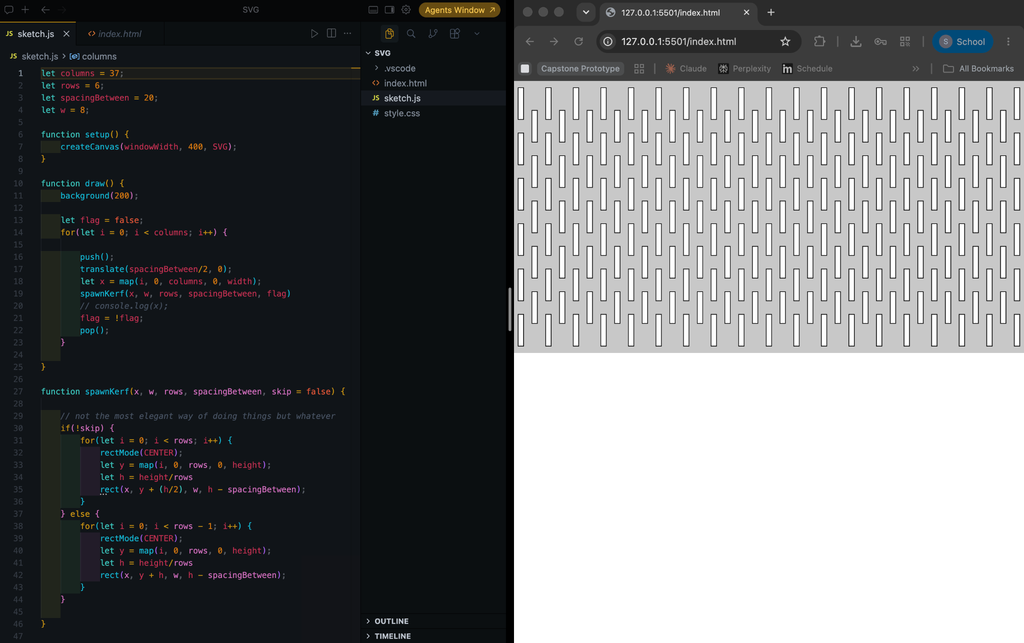
I wanted to try out three different designs. Two were related to kerf bending my own design compared to the kind of kerf bending using plywood and another using acrylic which I based off of a portrait.
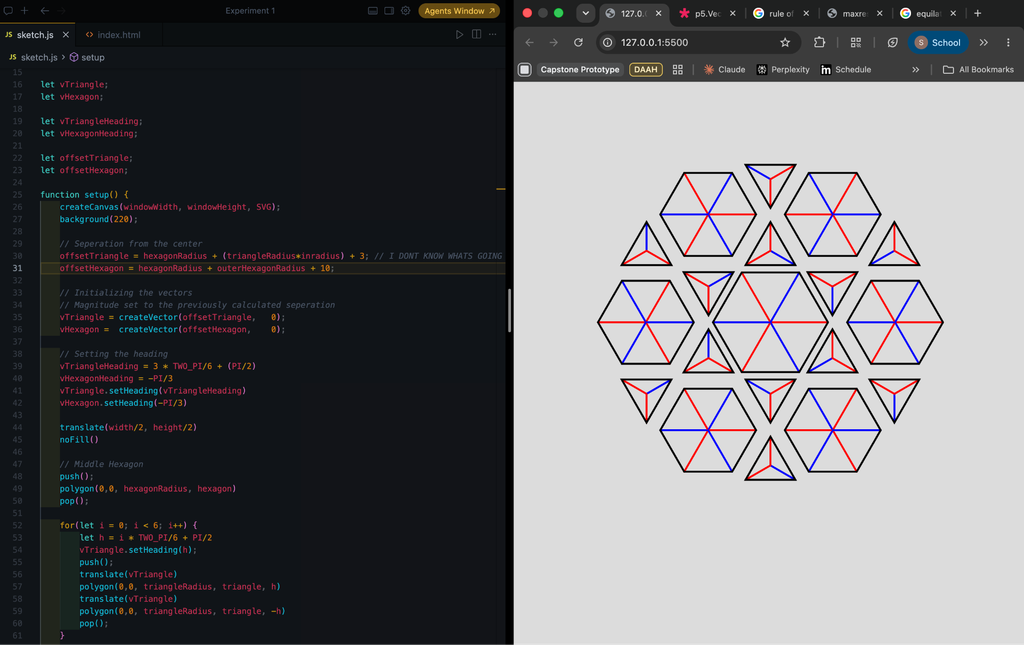
For the kerf bending I tried to experiment with hexagons and triangles to make a repeating pattern. I hypothesized that by using such a pattern not only would it become more flexible but also could bend from other directions. As for the acrylic design, I would use engraving rather than cutting and my hope was that because I would use a black acrylic the engraving would come out as white making an interesting pattern.
Designs
Design 1: Generic Kerf Bending
let columns = 37;
let rows = 6;
let spacingBetween = 20;
let w = 8;


function setup() {
   createCanvas(windowWidth, 400, SVG);


   noFill()
   let flag = false;
   for(let i = 0; i < columns; i++) {


       push();
       translate(spacingBetween/2, 0);
       let x = map(i, 0, columns, 0, width);
       spawnKerf(x, w, rows, spacingBetween, flag)
       // console.log(x);
       flag = !flag;
       pop();
   }
}


function draw() {
   // background(200);
}


function spawnKerf(x, w, rows, spacingBetween, skip = false) {


   // not the most elegant way of doing things but whatever
   if(!skip) {
       for(let i = 0; i < rows; i++) {
           rectMode(CENTER);
           let y = map(i, 0, rows, 0, height);
           let h = height/rows
           rect(x, y + (h/2), w, h - spacingBetween);
       }
   } else {
       for(let i = 0; i < rows - 1; i++) {
           rectMode(CENTER);
           let y = map(i, 0, rows, 0, height);
           let h = height/rows
           rect(x, y + h, w, h - spacingBetween);
       }
   }

}


function mouseClicked() {
   save("Kerf-bending test")
}
For this design I just wanted to make a design similar to what we saw in class but without using online resources . I wanted to experiment, figure it out myself, I thought it wouldn’t be that hard (foreshadowing). I did make a mistake however: I should have been more brave and made more rows and columns, I worried that the plywood may break or the laser cutter may not be able to cut so close to other lines and it may break during the process.
The next design used lines that were far closer to each other and that was when I really learned what was possible. It was also while I was in the IM Lab that I saw someone write on the wall that the laser cutter kerf was 0.2-0.3mm. If I understood that correctly it means that the thickness of the cut left behind by the laser is 0.2-0.3mm which I will keep in mind for future projects.
Design 2:
Initial attempt: See more below
Second attempt: Trying out a new technique which ended up working out
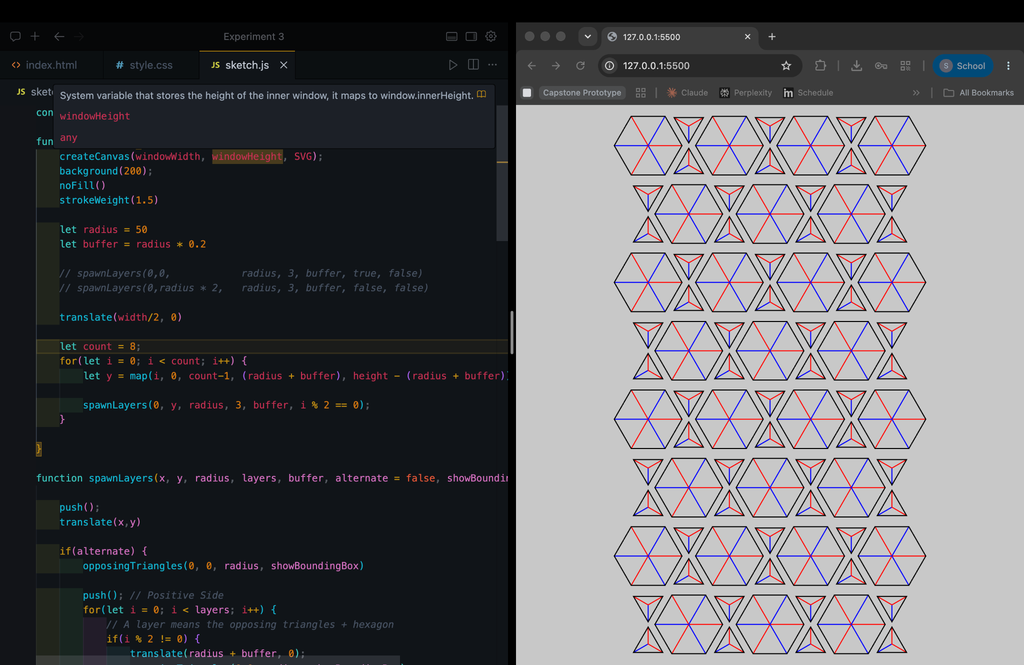
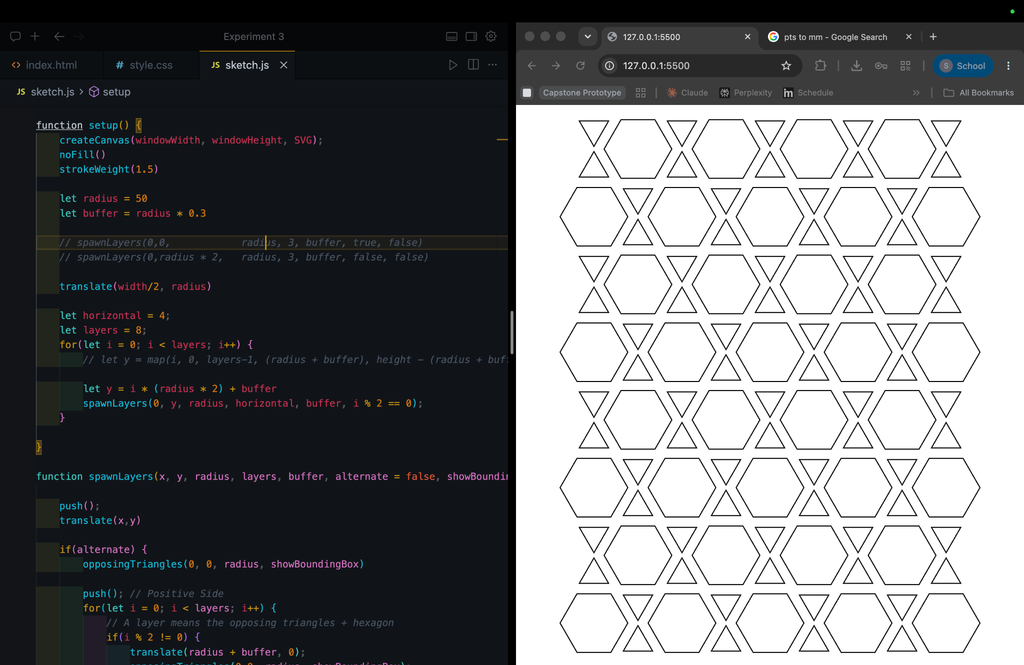
Final result: Removed the red and blue lines indicating how the polygons were drawn, and I removed the background.
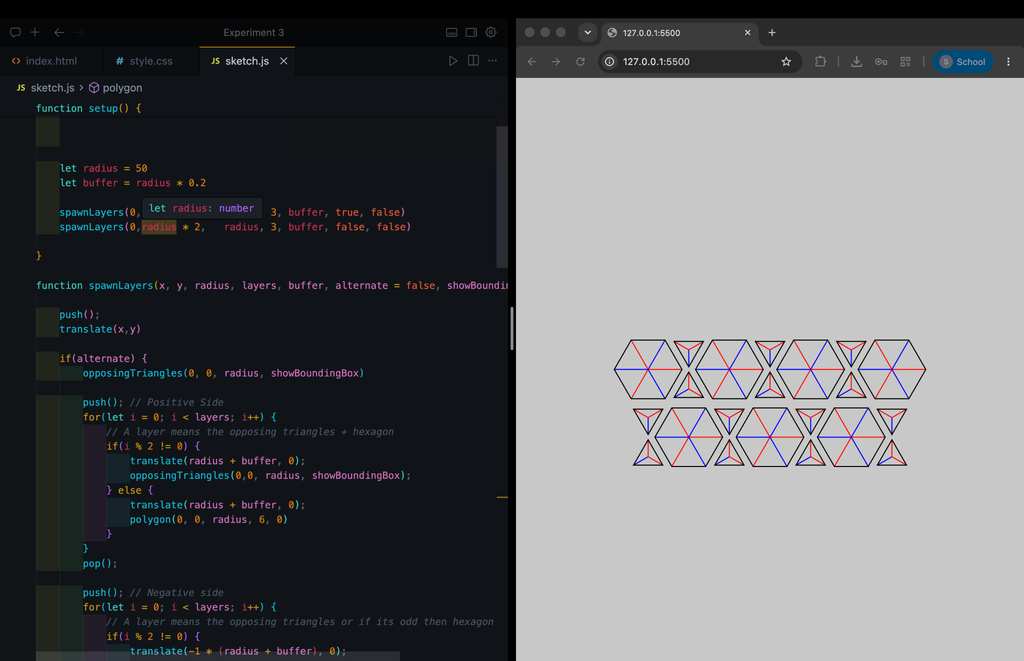
You may have noticed that I tried two different methods of achieving this pattern. Put simply, I was overthinking it. In the beginning I tried starting from the center, and spawning the hexagons and triangles outward from the center. Doing this for n layers was much harder than I thought it would be, the first image was as far as I got. In desperation I started using vectors and the translate function more often but to no avail.
In bed later that night I realized I had been doing it all wrong. If I just worked layer by layer I would achieve the same pattern. I could also modify the length of the layers and rotation and maybe even make it circular but for the kerf design all I need is a pattern that spans the length rather than a radial one.
Initial Attempt Code
/*
Goal:
Hexagonal pattern starting from the center then triangles, then ...
Maybe recursion?
*/


const hexagon = 6
const hexagonRadius = 30;
const outerHexagonRadius = 25;


const triangle = 3
const triangleRadius = 15


const inradius = (Math.sqrt(3)) / 6


let vTriangle;
let vHexagon;


let vTriangleHeading;
let vHexagonHeading;


let offsetTriangle;
let offsetHexagon;


function setup() {
   createCanvas(windowWidth, windowHeight, SVG);
   background(220);

   // Seperation from the center
   offsetTriangle = hexagonRadius + (triangleRadius*inradius) + 3; // I DONT KNOW WHATS GOING ON
   offsetOuterTriangle = outerHexagonRadius + (triangleRadius*inradius) + 3; // I DONT KNOW WHATS GOING ON
   offsetHexagon = hexagonRadius + outerHexagonRadius + 10;

   // Initializing the vectors
   // Magnitude set to the previously calculated seperation
   vTriangle = createVector(offsetTriangle,   0);
   vHexagon =  createVector(offsetHexagon,    0);


   // Setting the heading
   vTriangleHeading = 3 * TWO_PI/6 + (PI/2)
   vHexagonHeading = -PI/3
   vTriangle.setHeading(vTriangleHeading)
   vHexagon.setHeading(-PI/3)

   translate(width/2, height/2)
   noFill()

   // Middle Hexagon
   push();
   polygon(0,0, hexagonRadius, hexagon)
   pop();


   for(let i = 0; i < 6; i++) {
       let h = i * TWO_PI/6 + PI/2
       vTriangle.setHeading(h);
       push();
       translate(vTriangle)
       polygon(0,0, triangleRadius, 3, h)
       translate(vTriangle.x *0.9, vTriangle.y *0.9);
       polygon(0,0, triangleRadius, 3, -h)
       pop();
   }

   for(let i = 0; i < 6; i++) {
       let h = i * TWO_PI/6;
       vHexagon.setHeading(h);
       push();
       translate(vHexagon)
       polygon(0,0,outerHexagonRadius, 6, h)
       // let a = createVector(offsetOuterTriangle + 0.8, 0)
       // let theta = 2 * TWO_PI/6 + PI/2;
       // a.setHeading(theta)
       // translate(a)
       // polygon(0,0, triangleRadius, 3, theta)
       pop();
   }

}


function layer(vTriangle, vHexagon, triangleRadius, outerHexagonRadius) {
   for(let i = 0; i < sides; i++) {
       let h = i * TWO_PI/sides + PI/2
       vTriangle.setHeading(h);
       push();
       translate(vTriangle)
       polygon(0,0, triangleRadius, 3, h)
       translate(vTriangle.x *0.9, vTriangle.y *0.9);
       polygon(0,0, triangleRadius, 3, -h)
       pop();
   }

   for(let i = 0; i < 6; i++) {
       let h = i * TWO_PI/sides;
       vHexagon.setHeading(h);
       push();
       translate(vHexagon)
       polygon(0,0,outerHexagonRadius, 6, h)
       pop();
   }
}


function draw() {
}


function polygon(x, y, radius, sides = 3, angle = 0) {
   beginShape();
   for (let i = 0; i < sides; i++) {
       const a = angle + TWO_PI * (i / sides);
       let sx = x + cos(a) * radius;
       let sy = y + sin(a) * radius;


       // Making the red and blue lines
       push();
           if(i % 2 == 0) {
               stroke(255, 0 ,0)
           } else {
               stroke(0, 0 ,255)
           }
           line(x, y, sx, sy)
       pop();


       vertex(sx, sy);
   };
   endShape(CLOSE);
};
Final Attempt Code
const inradius = (Math.sqrt(3)) / 6


function setup() {
   createCanvas(windowWidth, windowHeight, SVG);
   noFill()
   strokeWeight(1.5)


   let radius = 35
   let buffer = radius * 0.3

   // spawnLayers(0,0,            radius, 3, buffer, true, false)
   // spawnLayers(0,radius * 2,   radius, 3, buffer, false, false)

   translate(width/2, radius)


   let horizontal = 6;
   let layers = 14;


   for(let i = 0; i < layers; i++) {
       // let y = map(i, 0, layers-1, (radius + buffer), height - (radius + buffer));


       let y = i * (radius * 2) + buffer
       spawnLayers(0, y, radius, horizontal, buffer, i % 2 == 0);
   }


}


function spawnLayers(x, y, radius, layers, buffer, alternate = false, showBoundingBox = false) {


   push();
   translate(x,y)


   if(alternate) {
       opposingTriangles(0, 0, radius, showBoundingBox)


       push(); // Positive Side
       for(let i = 0; i < layers; i++) {
           // A layer means the opposing triangles + hexagon
           if(i % 2 != 0) {
               translate(radius + buffer, 0);
               opposingTriangles(0,0, radius, showBoundingBox);
           } else {
               translate(radius + buffer, 0);
               polygon(0, 0, radius, 6, 0)
           }
       }
       pop();


       push(); // Negative side
       for(let i = 0; i < layers; i++) {
           // A layer means the opposing triangles or if its odd then hexagon
           if(i % 2 != 0) {
               translate(-1 * (radius + buffer), 0);
               opposingTriangles(0,0, radius, showBoundingBox);
           } else {
               translate(-1 * (radius + buffer));
               polygon(0, 0, radius, 6, 0)
           }
       }
       pop();
   } else {
       polygon(0, 0, radius, 6, 0)


       push(); // Positive Side
       for(let i = 0; i < layers; i++) {
           // A layer means the opposing triangles + hexagon
           if(i % 2 == 0) {
               translate(radius + buffer, 0);
               opposingTriangles(0,0, radius, showBoundingBox);
           } else {
               translate(radius + buffer, 0);
               polygon(0, 0, radius, 6, 0)
           }
       }
       pop();


       push(); // Negative side
       for(let i = 0; i < layers; i++) {
           // A layer means the opposing triangles or if its odd then hexagon
           if(i % 2 == 0) {
               translate(-1 * (radius + buffer), 0);
               opposingTriangles(0,0, radius, showBoundingBox);
           } else {
               translate(-1 * (radius + buffer));
               polygon(0, 0, radius, 6, 0)
           }
       }
       pop();
   }


   pop();
}


function opposingTriangles(x, y, radius, showBoundingBox = false) {
   rectMode(CENTER)
   if(showBoundingBox) {
       rect(0,0,radius, radius * inradius * 6)
   }
   polygon(0,radius * 2 * inradius, radius * 0.5, 3, PI/6)
   polygon(0,-1 * radius * 2 * inradius, radius * 0.5, 3, -PI/6)
}


function polygon(x, y, radius, sides = 3, angle = 0) {
   beginShape();
   for (let i = 0; i < sides; i++) {
       const a = angle + TWO_PI * (i / sides);
       let sx = x + cos(a) * radius;
       let sy = y + sin(a) * radius;


       // push();
       // if(i % 2 == 0) {
       //     stroke(255,0,0)
       // } else {
       //     stroke(0,0,255)
       // }
       // line(x,y, sx, sy);
       // pop();


       vertex(sx, sy);
   };
   endShape(CLOSE);
}


function mouseClicked() {
   save("Hexagon pattern")
}
The inradius const at the top was to get the triangles to be the right distance away from each other. An inradius is the length from the center of the triangle to the middle of the side. I tried to be as mathematically consistent throughout the sketch so that the distance between each side and another was equal. For example I originally tried to map the layers to the width but that meant the separation between layers was inconsistent. There were a few points where the measurements weren’t quite right and I tried multiplying by other numbers till it worked.
I remember being confused when trying to line up the triangle to the hexagon, I thought that in theory by having the radius be the same then they would line up perfectly assuming that the radius is equal to side length side each segment was an equilateral triangle. For whatever reason that didn’t work. Either my math and research was incorrect or I misunderstood how the code worked. Nonetheless it doesn’t have to be perfect.
Design 3:
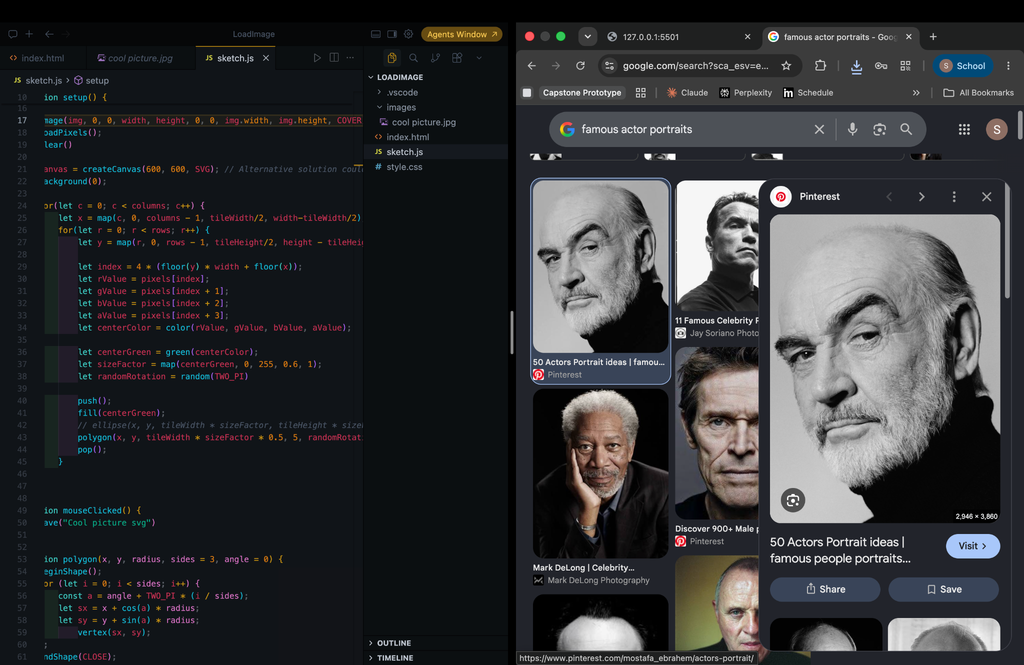
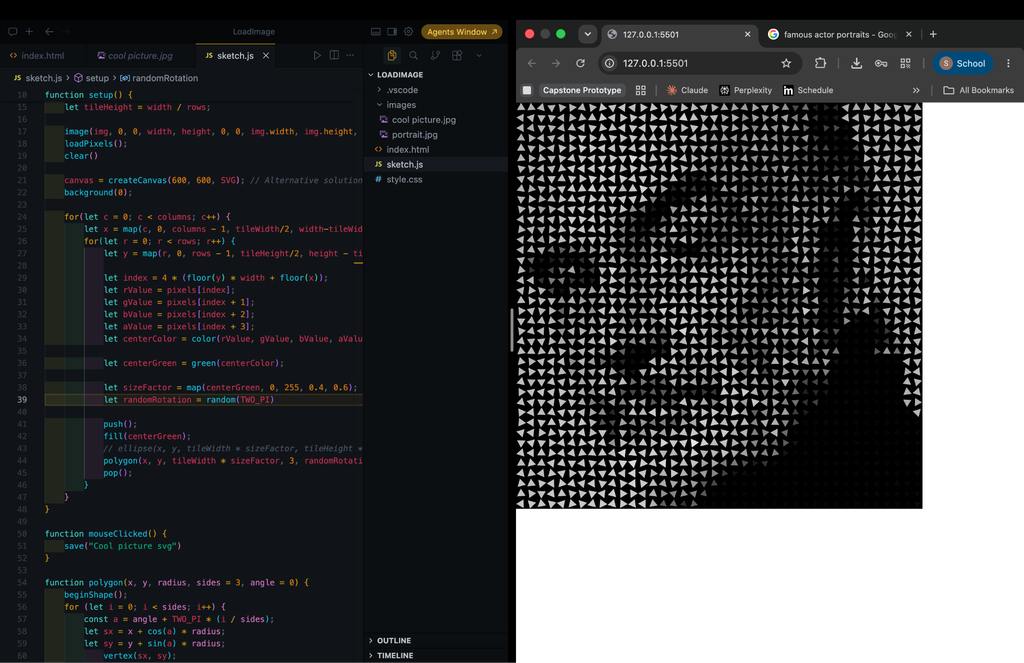
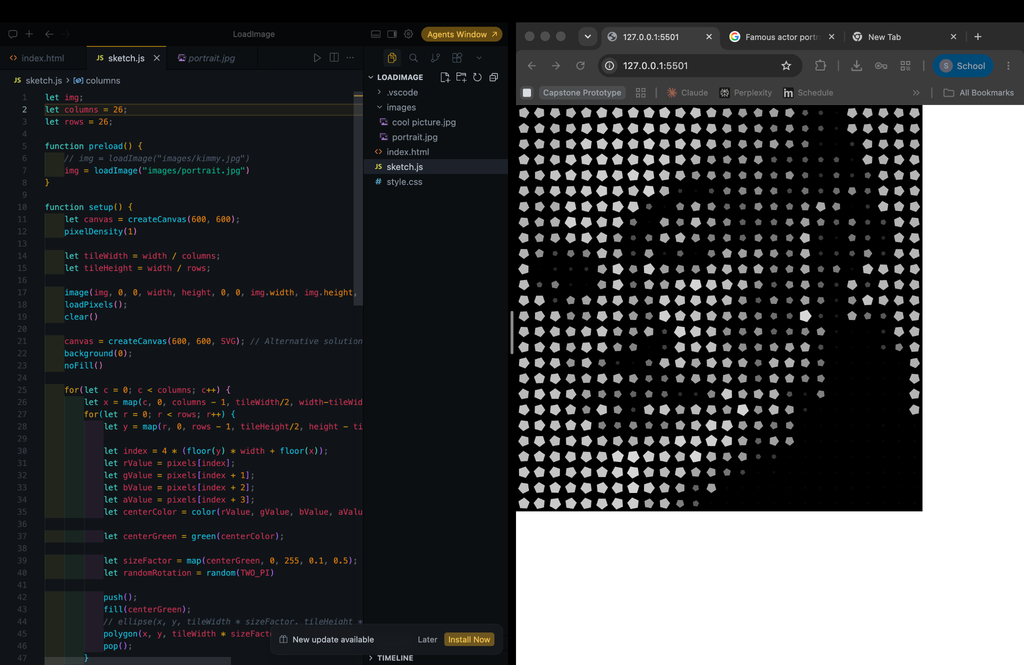
I used the code we had made in class. In class I actually tried a different image, I found a landscape photograph and since green was a prominent color I used green(centerColor) which seemed to work well but when I carried it over to the new portrait image it continued to work so I didn’t change it. In addition, for the code we made in class we used ellipses. I modified the code to use polygons and I changed the sizeFactor mapping a bit since the polygons would overlap at times.
I then experimented with the number of sides: I tried triangles and used a random rotation to make the image more interesting. I realized if I was going to use triangles the rotation would have to be intentional as if it was matching the flow of the image in some way. I tried squares, then pentagons, then hexagons but pentagons were my favorite. I preferred pentagons because the rotation was more discreet but it wouldn’t disrupt the flow of the image since for hexagons you couldn’t tell there was any random rotation unless you looked very closely and to be honest squares were boring.
Before saving it as an SVG I removed the fill and background.
Laser Cutting
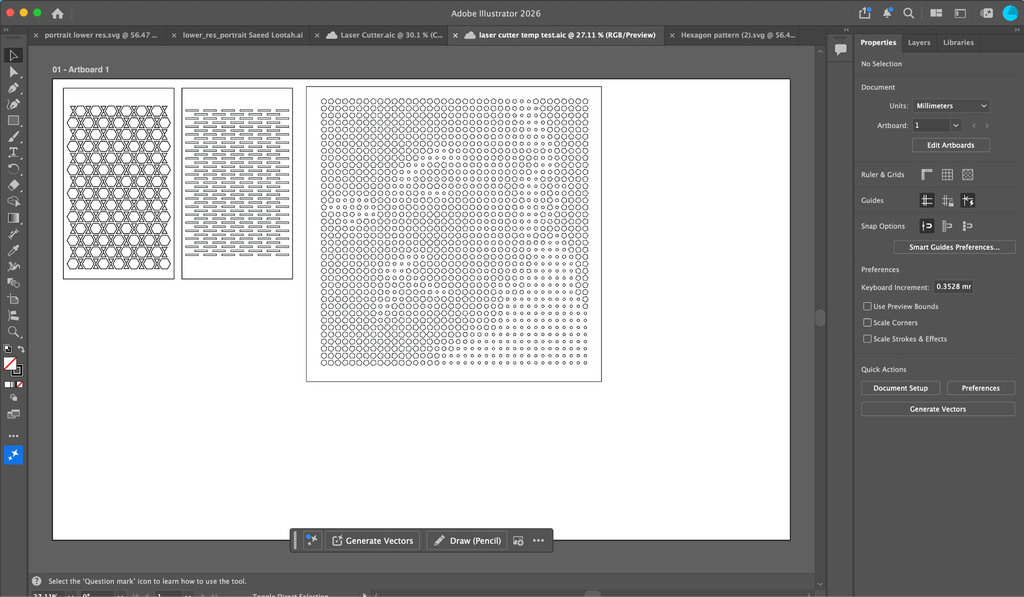
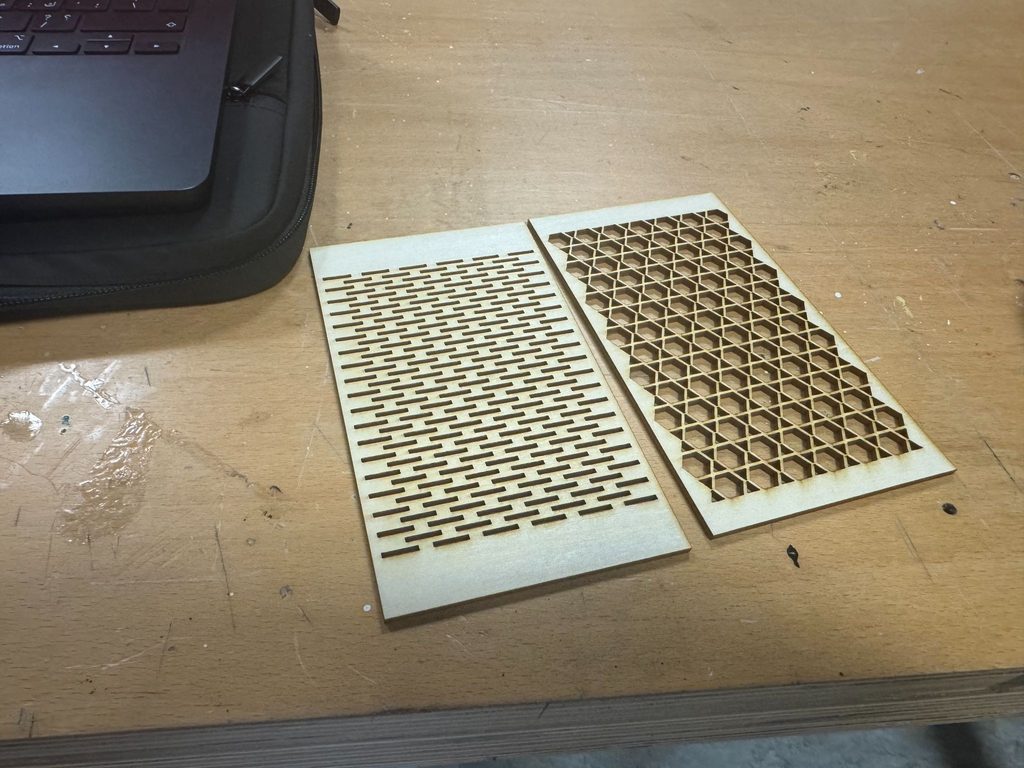
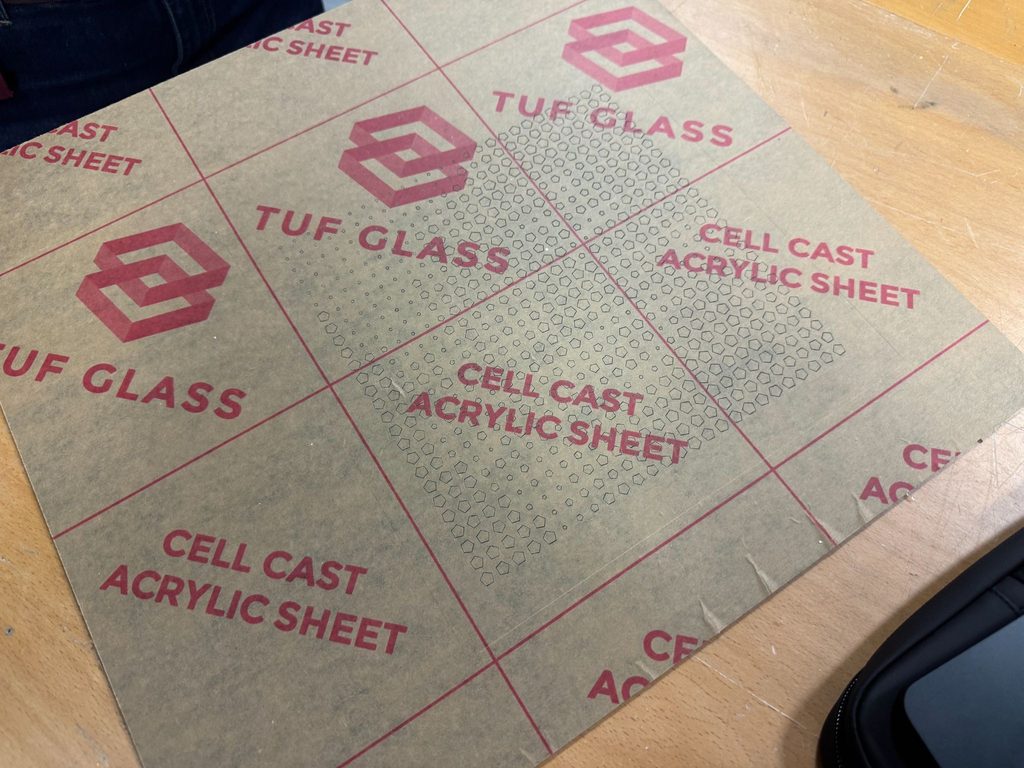
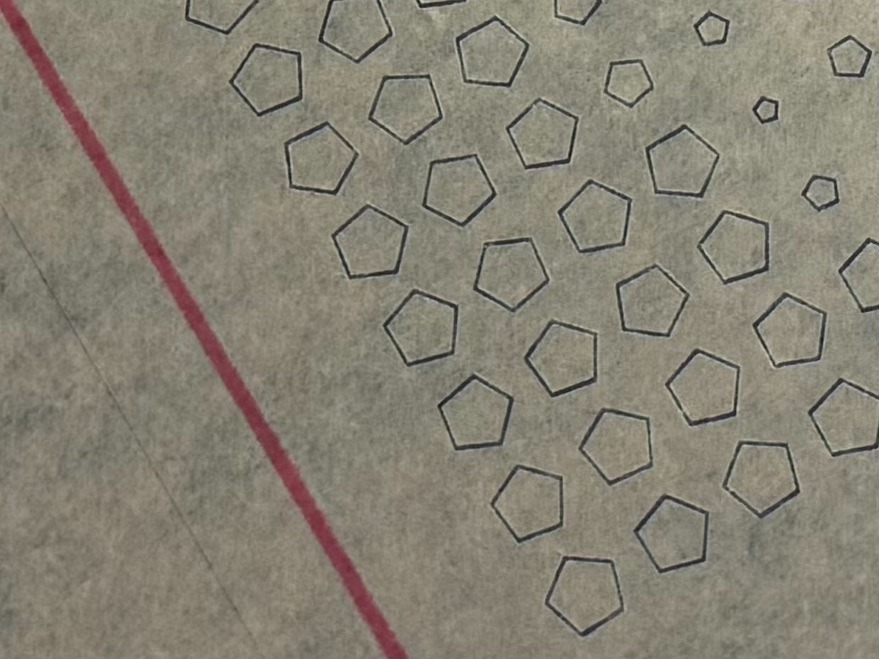
This was probably the most frustrating part of the project. I’ll say first what I should have done. I should have changed the strokes on the files to be what they should have been. I was hoping the assistant would know better because I didn’t know exactly what it should have been. I should have asked on Discord first before booking. The laser cutting took about 5 minutes for designs 1 and 2. But the technical issues and moving files around took up 90% of the time of my booking. Someone else was after me so I had to come back about an hour later for design 3 and the hexagons were engraved but the frame wasn’t cut out.
I’ve booked another session with the laser cutter later in the evening in hopes that I can finally get design 3 to be cut properly. It was the design I was most excited about but oh well. Hopefully next time. I may also make some changes to the design.
Trying again!
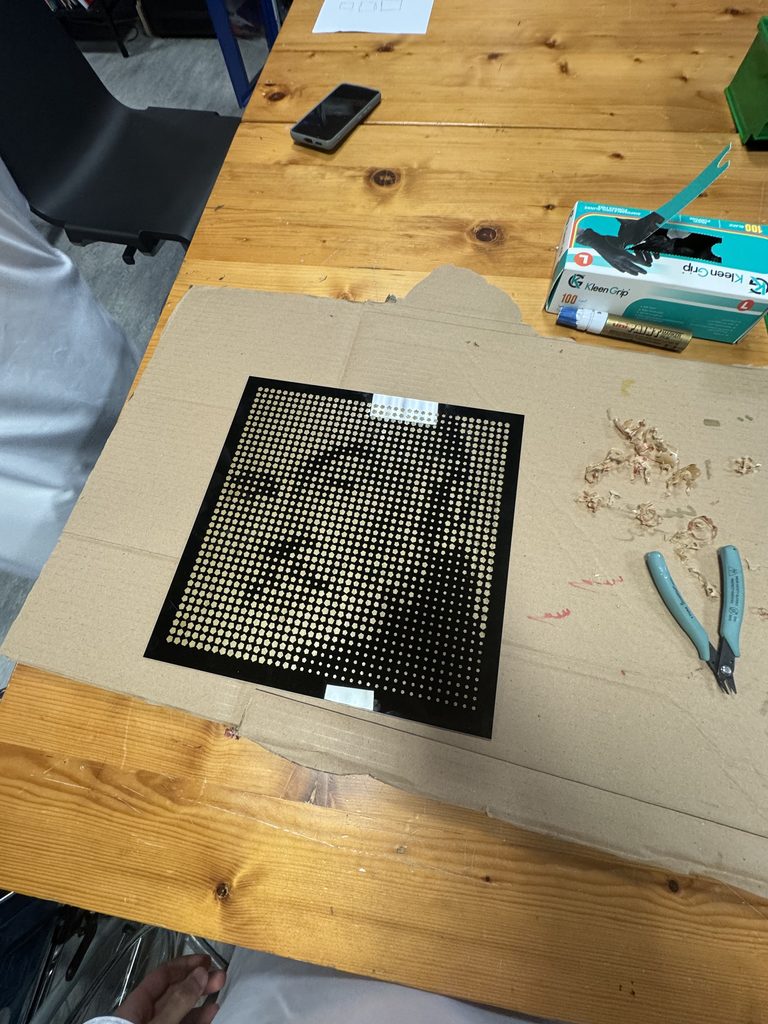
(Looks best from afar)
Reflection
There were a lot of improvements to be made. I think I’ve mentioned most of the troubles I had making this but I’ll quickly summarize what I should of done:
- Be more confident making lines closer to each other for kerf bending (see some examples online as well)
- Have the illustrator files ready with the correct stroke thickness.
- Try booking the laser cutter over two days if I have a lot of designs rather than one evening (can always cancel the next one if it doesn’t work out).
No Generative AI was used throughout the assignment.
Polygon code was taken from this:
https://editor.p5js.org/Ji/sketches/msBg12B1-
For some reason the example can no longer be found but when writing my code it showed up as a code autocomplete from either my p5js Snippets extension or P5 Snippets and Tools. These are the Extension ID’s respectively if you want to use them:
- Extension ID: acidic9.p5js-snippets
- Extension ID: Dominikasinski.p5-snippets-and-tools